GemRaid - Free spins, coins, and gift codes that actually work.GemRaid - Free spins, coins, and gift codes that actually work.GemRaid - Free spins, coins, and gift codes that actually work.GemRaid - Free spins, coins, and gift codes that actually work.
Error code 280 is the one that pops up as: “Disconnected. Your version of Roblox may be out of date. Please update Roblox and try again. (Error Code: 280).” That’s it. No hidden ban wave, no account flag — your client and Roblox’s servers just aren’t running the same version of the app, and the server won’t let a mismatched client into a game. Simple problem. Annoyingly, the fix isn’t always as simple as it sounds, because “just update it” doesn’t work when the update check itself is broken — which, based on actual user reports, happens more than you’d think.
Tags
Written by Alex Rider
Hey, I'm Alex—GemRaid's Roblox guy. I write no-nonsense field-tested guides and listicles to help you play smarter, cut the fluff, and get more out of every game.
You might also like
More guides and updates to help you stay ahead.
“I've personally hit the Roblox error code 280 on my Windows install after a slow patch rollout — the in-app checker told me I was current, and it still took the full uninstall-plus-AppData-wipe to clear it, about ten minutes start to finish.”
The fastest fix — try this before anything else
Close Roblox completely, then check for an update through the app itself (or the App Store / Play Store / Microsoft Store, depending on how you installed it). If an update shows up and installs cleanly, you’re done. If it says “no updates available” and you’re still getting kicked with error 280 — which is a genuinely common report — skip straight to the full reinstall below. Clicking “check for updates” over and over when the updater itself is the thing that’s broken is how people burn twenty minutes not fixing anything.
Windows: the reinstall that actually works
A plain uninstall through Settings leaves junk behind that reinfects the next install, so do the full version:
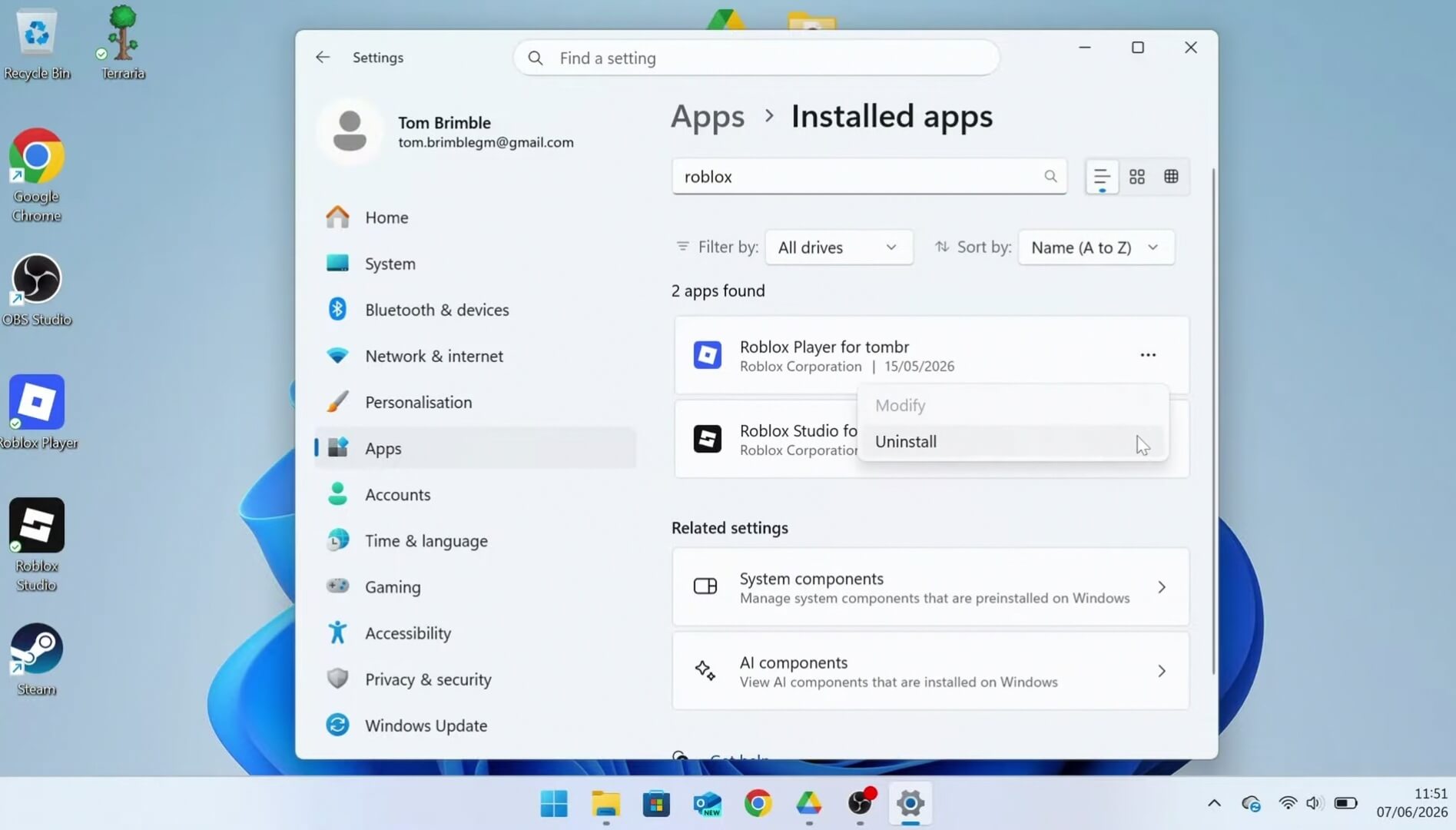
Uninstall Roblox — Go to Settings > Apps > Installed apps, select Roblox, and uninstall.
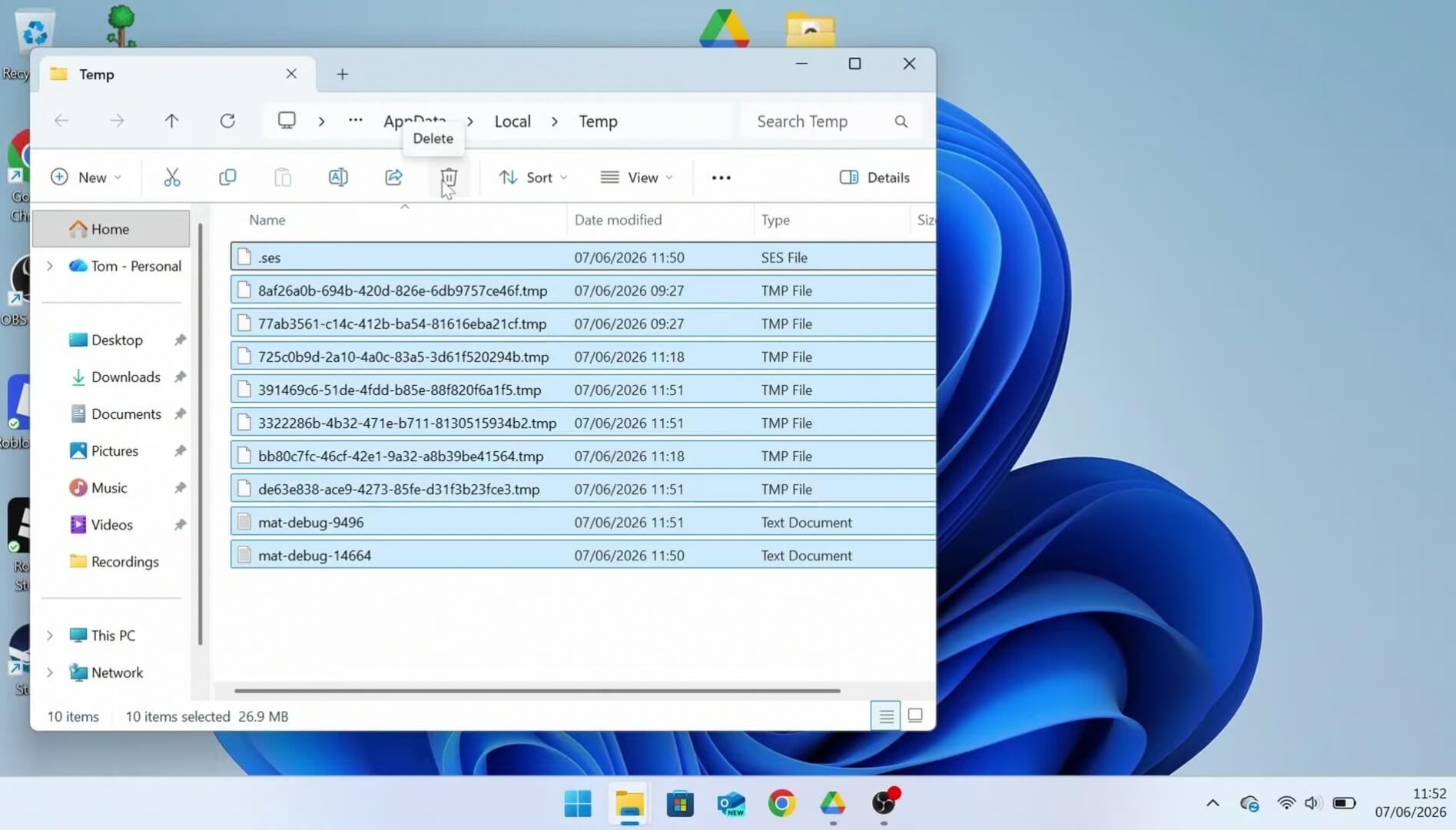
Clear the leftover app data — this is the step people skip and then wonder why the error comes right back. Open Command Prompt (Win+R), type %temp%, press Enter, select all files, and delete.
Restart the PC, reinstall from roblox.com, and try again.
If you got Roblox through the Microsoft Store rather than the standard installer, the AppData folder trick won’t touch it — the Store version runs in its own sandbox. Go to Settings > Apps, find Roblox, open Advanced options, and use Repair first, Reset second if Repair doesn’t stick. This is standard UWP troubleshooting, not something Roblox documents specifically for this error, so treat it as a secondary option rather than the primary fix path.
Mac
Drag the app to Trash (or Cmd+Delete it), reinstall from the official site, then check System Settings > Privacy & Security to confirm Roblox actually has permission to run — Gatekeeper blocking a fresh install silently is a real and common cause of launch failures.
iOS, Android, Fire OS, ChromeOS
Same basic order on all four: force-close the app, reboot the device, and if that doesn’t clear it, delete and reinstall from your platform’s store (App Store, Play Store, Amazon Appstore, or via the Android container on ChromeOS). One step that’s easy to blow past on mobile: check that your device’s date and time are actually correct, and set to update automatically. A clock that’s drifted breaks the secure handshake the update check relies on — this is one of the few genuinely technical explanations in the source material that Roblox’s own docs back up directly.
If none of that works: it’s probably your network
Firewalls, school/work networks, and some ISPs block or throttle the traffic Roblox’s updater needs to pull a new build. Roblox’s own advice here is thin — basically “try a different connection, then contact your ISP” — but in practice, switching from Wi-Fi to mobile data (or vice versa) for a test launch is the quickest way to confirm whether your network is the culprit before you waste more time reinstalling.
Running Bloxstrap or another third-party launcher?
If you’re on a custom bootstrapper that lets you pick a deployment channel, switching to an experimental or beta channel can strand you on a build the game servers no longer recognize, which throws this exact error. This has not been independently verified beyond a community bug report referencing it, so treat it as a known community issue, not confirmed Roblox behavior — but if you’re using a modded launcher and everyone else is fine, that’s the first place to look. Switch the channel back to the default/live track and relaunch.
Error 280 vs. the other Roblox disconnect codes
Worth knowing because people search “error 280” when they’ve actually hit something else entirely:
279 (ID 17) — the client can’t establish a network connection to the game server at all, usually a firewall/NAT issue, not a version problem.
277 — you were already in a game and lost connection mid-session; 280 stops you before you even get in.
268 — a kick for “unexpected client behavior,” which Roblox attributes to network connection problems or antivirus software interfering — it’s widely assumed in the community to be an anti-cheat trigger, but Roblox’s own support page frames it as a network/software-conflict issue, not explicitly an anti-cheat flag, so that should not be stated as fact.
524 — a permissions block on a private/VIP server or restricted experience, completely unrelated to your client version.
264 — the same account is active on two devices at once; log out of one.
Here’s the thing that actually stood out: the fix steps for 264, 266, 268, 277, 279, and 280 are close to identical — uninstall, clear app data, check network, check date/time. Roblox isn’t giving you a bespoke diagnosis for each error code so much as running the same generic troubleshooting checklist under a different headline each time. That’s not a knock — most of these are client-side hygiene issues — but it means the “why does this happen” text is doing more marketing than diagnosis, and you shouldn’t expect a deeper root-cause explanation than “your local install and the servers disagree.”
FAQ
What is error code 280 on Roblox? It’s a version-mismatch disconnect — your installed Roblox client doesn’t match what the game servers expect, so you’re blocked from joining until you update or reinstall.
What does “Roblox disconnected error code 280” mean specifically? Same error — “disconnected” is just the leading word in the full pop-up message. It means the server actively cut the connection rather than you losing signal.
Does error code 280 mean I’ve been banned? No. It’s purely a version check failure, not an account penalty.
I checked for updates and it says I’m up to date, but I still get error 280 — now what? This is the scenario where a partial or corrupted update is the likely cause, not an actual missing update. Do the full uninstall plus AppData wipe above rather than relying on the in-app update checker, which appears to be exactly what’s misreporting your version.
Will this fix itself if I just wait? Sometimes — if it’s a delayed rollout on Roblox’s end, other players tend to report the same thing around the same time. But if you’re the only one seeing it, don’t wait around; it’s local.


 GemRaid - Free spins, coins, and gift codes that actually work.