GemRaid - Free spins, coins, and gift codes that actually work.GemRaid - Free spins, coins, and gift codes that actually work.GemRaid - Free spins, coins, and gift codes that actually work.GemRaid - Free spins, coins, and gift codes that actually work.
How to Delete a Roblox Account (The Right Way, Not the Rage-Quit Way)
Learn how to delete your Roblox account for good—deactivation vs. permanent deletion, canceling subscriptions first, and filing a Delete My Account request.
Roblox doesn’t have a delete button. That’s not an oversight — it’s by design. Where most platforms let you nuke an account in two taps, Roblox runs a two-tier system: deactivation, which is basically a pause button, and permanent deletion, which is a formal legal process under global privacy law. Mix the two up, or skip a step, and you can end up with a canceled account and a still-billing subscription — or worse, a wiped account you can never get back.
Here’s the whole process, no legal-department buzzwords, just what actually happens and what you need to do in order.
Tags
Written by Alex Rider
Hey, I'm Alex—GemRaid's Roblox guy. I write no-nonsense field-tested guides and listicles to help you play smarter, cut the fluff, and get more out of every game.
You might also like
More guides and updates to help you stay ahead.
Deactivation vs. Deletion: Know Which One You Actually Want
These are not the same action, and Roblox treats them completely differently on the backend.
Deactivation is a soft close. Your profile disappears from public search, your avatar goes invisible to other users, but everything else — your inventory, Robux, friends list, game history — sits untouched in Roblox’s database. Some of your marketplace listings might even stay visible to other players. Log back in whenever you want, and it’s like you never left. Fully reversible.
Permanent deletion is a different animal entirely. It’s legally classified as a Right to be Forgotten (RTBF) request, filed under privacy frameworks like GDPR, CCPA, and COPPA. This isn’t a settings toggle — it’s a formal request that instructs Roblox to permanently scrub your identifiers, purchase history, and virtual property from active systems. Once it’s done, support can’t undo it. Nobody can. Your Robux, your inventory, your account — all of it is gone for good.
What You’re Comparing
Deactivation
Permanent Deletion (RTBF)
How you do it
Privacy settings toggle
Official support ticket / privacy request
What happens to your data
Archived, hidden, retrievable
Permanently erased
Can you undo it?
Yes — just log back in
No — irreversible after ID verification
Robux and items
Kept as-is
Forfeited and scrubbed
Your public profile
Hidden from search
Replaced with an [Account Deleted] tag
Marketplace listings
May stay visible to others
Removed or unlinked from your identity
Subscriptions
Keep auto-renewing unless you cancel
Must be manually canceled first
If you just need a break, deactivate. If you actually want out for good, keep reading — because deletion has steps you can’t skip.
Step One: Cancel Your Subscriptions First. Seriously.
This is where most people mess up. Deleting your Roblox account does not automatically cancel Roblox Premium. Since Roblox routes billing through whatever platform you subscribed on — Apple, Google, Microsoft, whoever — deleting your account can leave that subscription running with nothing attached to it. That’s called orphaned billing, and it means you keep getting charged for a profile that no longer exists.
You have to cancel through the exact platform where you originally subscribed:
Subscribed on web/browser: Log into roblox.com, click the gear icon top-right, go to Subscriptions or Billing, and hit Cancel Renewal. Your benefits run out at the end of the current cycle — they don’t vanish instantly.
Subscribed on iOS: This one’s entirely locked to your Apple ID — Roblox support literally can’t touch it from their end. Open Settings on your device, tap your Apple ID banner, go to Subscriptions, select Roblox, and tap Cancel Subscription.
Subscribed on Android: Same deal, but through Google. Open the Play Store, tap your profile icon, go to Payments & Subscriptions, select Roblox Premium, and confirm the cancellation.
Subscribed via Microsoft Store or Amazon Appstore: Good news — nothing to do here. These are structured as one-time, non-renewing 30-day allocations. They just expire on their own.
Playing on console (Xbox, PlayStation, Meta Quest): Consoles don’t handle subscription billing natively at all. You’ll need to log into a mobile device or browser to actually cancel — the console itself won’t get you there.
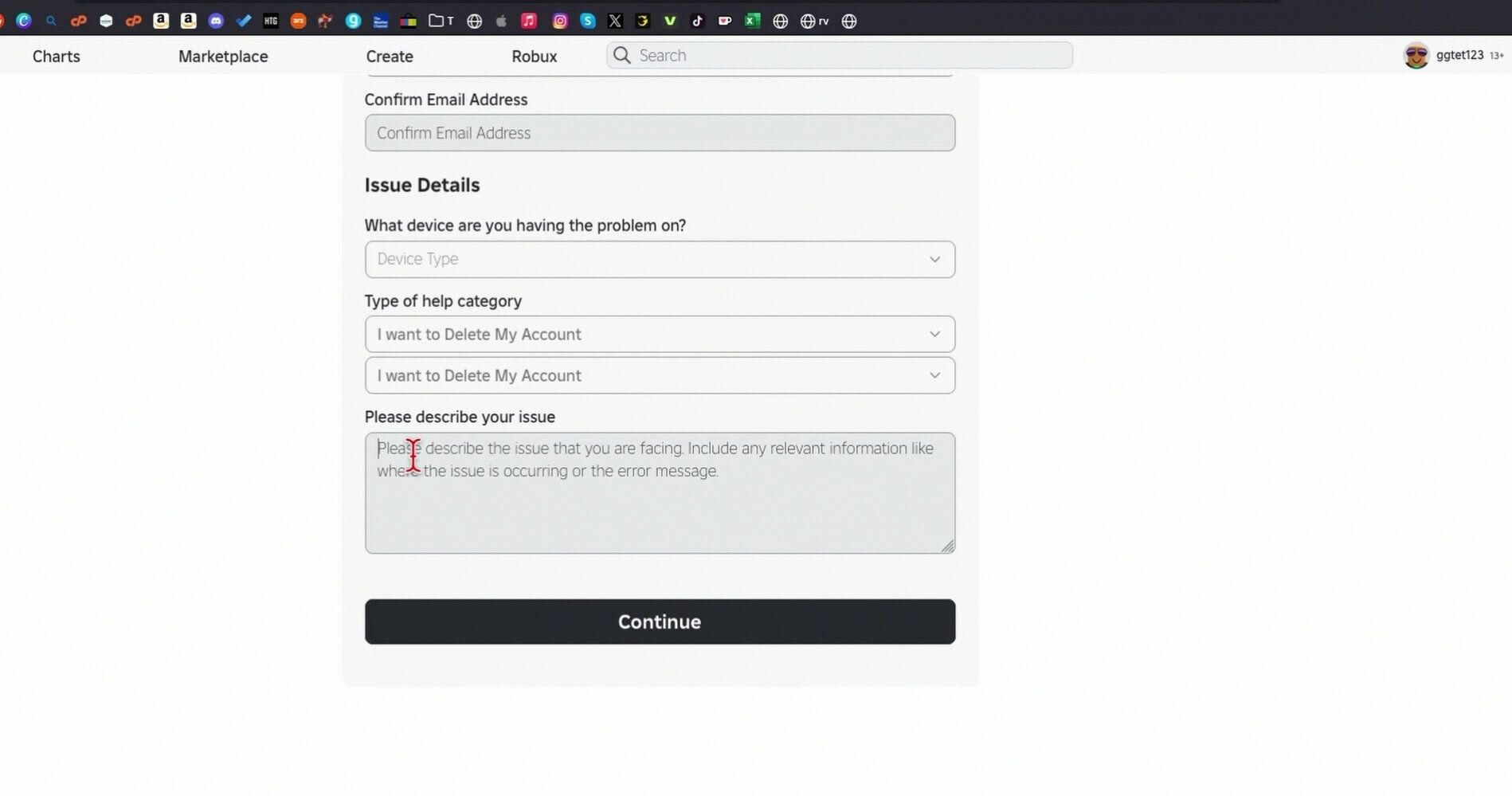
Fill in your contact info — make sure the username and email match the account you’re closing.
Pick the device you primarily use from the hardware dropdown.
Set the help category to I want to Delete My Account.
Set the subcategory to I want to Delete My Account.
In the description box, write something explicit and unambiguous, like: “I am formally requesting the permanent deletion of my Roblox account and all associated personal data under the Right to be Forgotten (RTBF) data privacy framework. I understand that this action is permanent and irreversible.”
Submit, and clear the CAPTCHA.
Method 2: Mobile App (iOS & Android)
Open the Roblox app and make sure you’re logged into the right account.
Tap the More icon (three dots) in the bottom nav bar.
Tap Settings, then Privacy.
Scroll to the bottom, to Account Deactivation and Deletion.
Tap Delete Account — this opens the same Data Privacy support form as the web version.
Fill it out the same way: Data Privacy Requests → I want to Delete My Account, then submit.
Method 3: Parent-Initiated Deletion for a Kid’s Account
Under COPPA and GDPR-K, parents have the legal right to delete an account belonging to a child under 13, no argument needed from the kid.
Enter the child’s Roblox username and your own verified parent email.
Select Data Privacy Requests, then I want to Delete My Account.
State clearly in the description that you’re exercising parental rights under COPPA/GDPR-K to permanently erase your child’s account.
Roblox will cross-check your email against the parent email on file in Parental Controls, or ask you to verify guardianship directly.
Also read
What Happens After You Hit Submit
Filing the ticket doesn’t delete anything instantly — there’s an identity check standing between your request and actual deletion, and for good reason. If it were instant, anyone who guessed your password could nuke your entire account and inventory in thirty seconds.
Here’s the sequence: Roblox emails the account’s registered address asking you to confirm you actually want this. You have to reply directly to confirm consent. In some cases — especially when ownership is unclear — Roblox brings in a third-party verification service called Persona, which will ask for a government ID photo and a live facial scan. Refuse or fail that check, and the deletion gets denied outright, which is actually the system working as intended.
Once you clear verification, Roblox’s backend kicks off a full data-scrubbing cascade — not just on Roblox’s own servers, but pushed out to every third-party game you’ve played. Developers get an automated Right to Erasure notice and are legally required to strip your UserId, stats, and saved inventory out of their own DataStores using tools like UserDataStoreService.
Phase
Who Handles It
What Actually Happens
Ticket filed
You (or a parent)
Submitted via roblox.com/support under Delete My Account
Email confirmation
Roblox Support
You reply to the automated email confirming intent
Identity check
Persona (third-party vendor)
Government ID + facial scan, if flagged
Central database scrub
Roblox Engineering
Profile erased, replaced with [Account Deleted (id)]
DataStore cascade
Third-party game developers
Your UserId gets stripped from every game’s saved data
The Edge Cases That Trip People Up
You Can’t RTBF Your Way Out of a Ban
If your account got permanently banned, filing a Delete My Account request isn’t a workaround to erase the record. Roblox routinely denies deletion requests on banned profiles, citing legal compliance and legitimate-interest exceptions in privacy law. They keep hardware hashes, IP logs, and linked emails specifically to stop banned users from spinning up alt accounts. You’ve got a strict 30-day window from the ban date to appeal — after that, the moderation record is locked in for good.
Someone Hijacked Your Account and Tried to Delete It
This is uglier than it sounds, and it’s a real tactic: someone breaks into your account, immediately files a Delete My Account request, and tries to permanently destroy your inventory before you notice. If this happens to you, move fast. Contact Roblox Support under Account Hacked or Can’t Log In, and bring proof of ownership — credit card receipts, PayPal transaction IDs, redeemed gift card codes. Solid financial proof is usually enough for support to halt a pending deletion and hand the account back.
Your Old Username Doesn’t Free Up Right Away
Deleting your account doesn’t put your username back into circulation immediately — Roblox locks it down to prevent impersonation and identity fraud. After a Delete My Account request completes, your username gets stripped from public APIs and replaced with a system tag like [Account Deleted (id)] or UNXXXXXXXX. That name then sits in a mandatory two-year lock where nobody can register it. After two years, it may — not guaranteed — get released back into the public pool during a maintenance sweep, unless it’s tied to a moderated account or a trademarked brand, in which case it’s reserved permanently.
Database State
What It Means
Can Anyone Grab the Username?
Active profile
Account’s live and normal
No — it’s yours
[Account Deleted (id)]
Delete My Account completed, data erased
Locked for 2 years
UNXXXXXXXX
Moderated / reset account state
Blocked entirely
Account Forgotten (uuid)
Long-term archived state
Possibly, during a sweep
Quick FAQ
What happens to my Robux and inventory when I delete my account? Gone. All of it — Robux balance, clothing, collectibles, game passes — permanently destroyed. Roblox doesn’t refund or transfer unused balances just because you closed the account voluntarily.
Can I undo a Delete My Account request once it’s done? No. Once identity verification clears and Roblox’s engineers execute the erasure, there’s no walking it back. That’s the whole point of the process.
Why does Roblox want my government ID just to delete an account? To stop someone else from deleting your account for you. Persona’s job is confirming you’re actually the account holder before anything irreversible happens.
I lost access to my registered email. How do I delete the account now? You’ll need to prove ownership another way — credit card transaction records, PayPal order IDs, or a physical Robux gift card code all work as backup proof.
If I uninstall the app, does that delete my account? No. Uninstalling just removes the app from your device. Your profile, inventory, subscriptions, and all database records stay fully active on Roblox’s servers until you actually file the request.
The Checklist Before You Hit Submit
Audit your subscriptions first. Cancel auto-renewal through whichever app store or billing portal you actually subscribed through — at least 24 hours before deletion.
Spend down what you can. Burn through any leftover Robux and back up personal files, because none of it survives the process.
File the actual request. Head to roblox.com/support, select Data Privacy Requests, then Delete NY Account.
Watch your email. Complete the confirmation reply and any Persona ID verification if you’re prompted for it.
Cut off third-party billing. Revoke Roblox’s auto-pay permissions in PayPal, your card portal, or your bank settings so nothing orphaned keeps charging you.
Skip step one and you’ll be the person still getting billed for a game you can’t even log into anymore. Don’t be that person.